Creative Studio
Flyers with QR codes for your events and questionnaires
Creative Studio turns an event or a questionnaire into a flyer for phones, social posts and print, using your logo, photos and sponsors. Its QR code lets people RSVP or answer right away. Every community can try 3 flyers free.
What you can make
Create professional-looking flyers with your photos, logo and sponsors. Add a QR code so people can RSVP or answer a questionnaire, then share digitally or print.
- Starts from your community's logo and colors, and the event's details
- Add your own photos and your sponsors' logos
- The QR code opens the RSVP page or questionnaire you attach the flyer to
- Reuse a design: duplicate it, change it, and use it again
- Share it in newsletters and social posts, or download a Letter-size PDF to print
Try 3 Creative Studio flyers free.
One-time trial per community. No quarterly reset. A flyer counts the first time you download or attach it. Starting, previewing and editing don't count, and using a counted flyer again is included.
To keep making flyers after the trial, Creative Studio is $10/month on the $49/month Club plan — $59/month in total if you're on Free today. It includes 10 AI backgrounds a month. You never need AI to make a flyer, and AI backgrounds aren't part of the free trial.
Try Creative Studio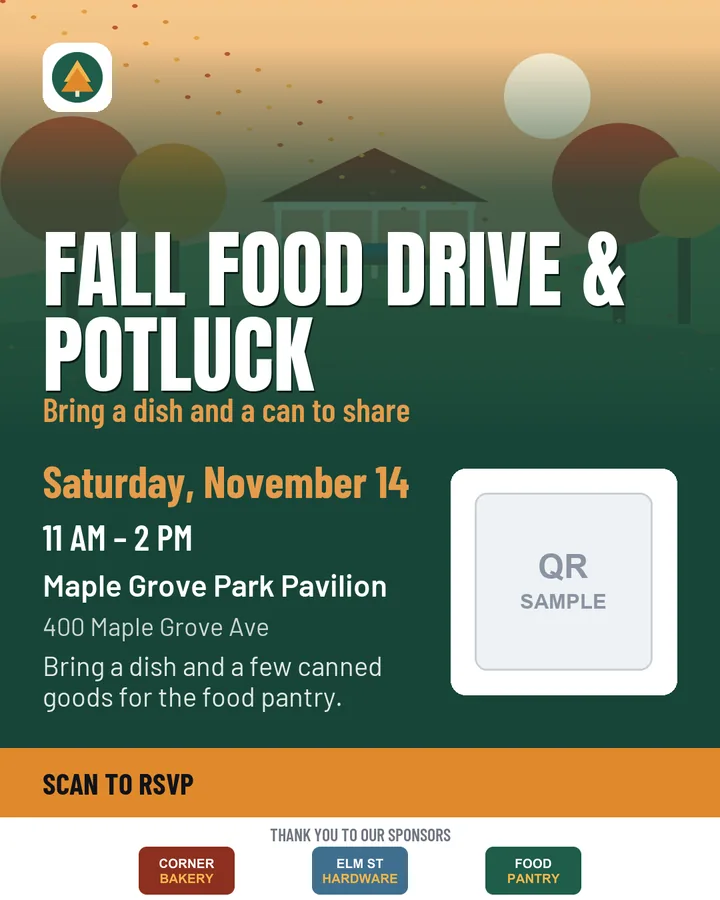
How the QR code works
In Creative Studio you choose what the QR code is for: an event RSVP or a questionnaire. The design shows a placeholder until you attach it. When you attach the flyer to an event, a questionnaire or a newsletter, its QR code opens that event's RSVP page or that questionnaire, so one design can be reused for different events. Downloads are made for a specific event or questionnaire, with its real QR code.
The free trial, step by step
- 3 flyers, one time per community. It doesn't reset.
- A flyer counts the first time you download it or attach it. Starting, previewing and editing don't count.
- Downloading or attaching a counted flyer again is included. A duplicate is a new design and counts when it's first used.
- After the trial, flyers you've used stay editable and usable. Starting or using another design needs Creative Studio.
- Creative Studio is $10/month on the $49/month Club plan ($59/month in total from Free), with 10 AI backgrounds a month.
- AI backgrounds are optional. The trial on the Club plan includes 3 in total; the trial on the Free plan doesn't include any.
Your community's admins use Creative Studio. Each event also has a simple flyer maker, free on every plan.
Creative Studio questions
Can we make flyers with QR codes?
Yes. Creative Studio makes flyers for phones, social posts and print — a 1080 × 1350 image or a Letter-size PDF — using your logo, photos and sponsor logos. You choose whether the QR code is for an event RSVP or a questionnaire; when you attach the flyer to an event, a questionnaire or a newsletter, the QR code opens that one. Every community can try 3 flyers free. Each event also has a simple flyer maker, free on every plan.
What happens after the three free Creative Studio flyers?
The trial is one time per community and doesn't reset. A flyer counts the first time you download it or attach it; starting, previewing and editing don't count, and using a counted flyer again is included. After the trial, the flyers you've used stay editable and usable. To start or use another design you need Creative Studio: $10 a month on the Club plan, with 10 AI backgrounds a month. On the Free plan that means Club ($49) plus Creative Studio ($10): $59 a month in total.
Does Creative Studio use AI?
Only if you want it to. Flyers are made from your own text, photos and logos; AI backgrounds are optional. The Creative Studio add-on includes 10 AI backgrounds a month. During the free trial, communities on the Club plan can make 3 AI backgrounds in total; the trial on the Free plan doesn't include AI backgrounds.